
A focused, fully-supported plugin that links your Azure DevOps commits, branches and pull requests to the right Jira issue — and lets you create branches and PRs without leaving Jira.
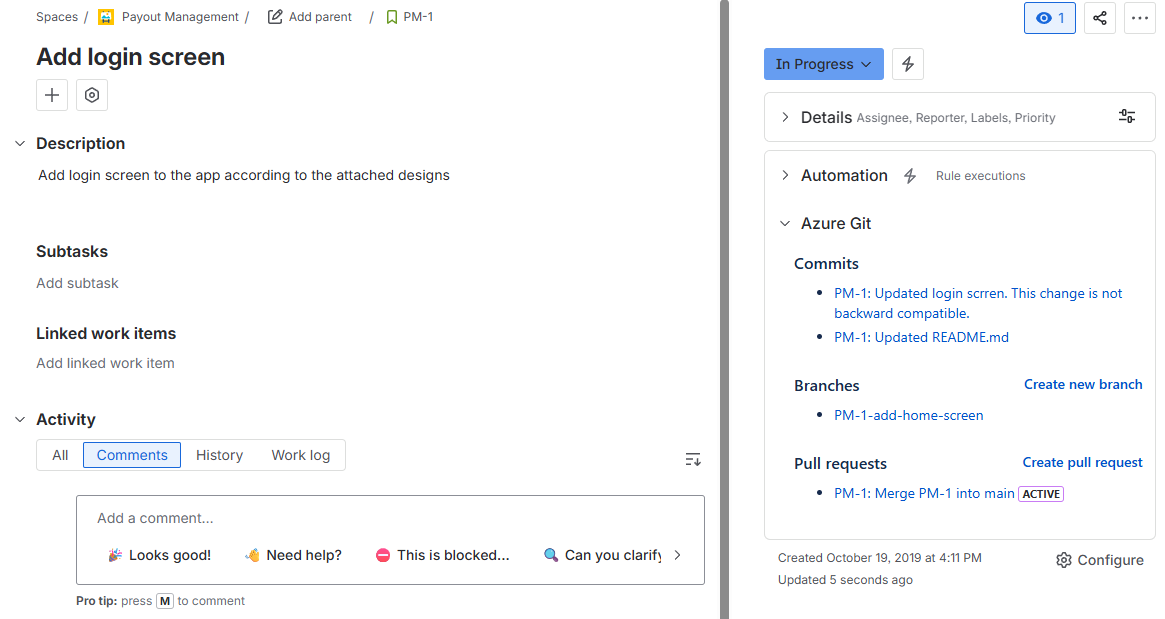
Git Listener matches your Azure DevOps activity to Jira issues by key and surfaces it in a dedicated panel — so the whole team can see development status without opening a repo.
Start work straight from the issue. Create a correctly-named branch or open a pull request in Azure DevOps in a couple of clicks.
A dedicated integration tuned for Azure DevOps repositories and workflows.
Activity appears on issues without manual linking or hand-wired webhooks.
Create branches and open pull requests directly from the Jira issue.
Detects issue keys in branch names, commits and PR titles to link the right work.
Actively maintained with responsive support from the team that builds it.
We read only metadata and never clone your code, with continuous security scanning.
Git Listener reads only the metadata it needs to link activity to issues — your source never leaves Azure DevOps.
Read our security overviewIt connects your Azure DevOps repositories to Jira, showing commits, branches and pull requests on each issue and letting you create branches and PRs without leaving Jira.
No. Git Listener reads commit, branch and pull-request metadata through the Azure DevOps API. Your source code is never cloned, copied or stored on our servers.
All traffic is encrypted in transit with TLS and stored data is encrypted at rest with AES-256. Access tokens are held in an encrypted secret store. It's continuously security-scanned.
Yes. From any issue you can create a branch (pre-named from the issue key and summary) or open a pull request in Azure DevOps — without leaving Jira.
This plugin is dedicated to Azure DevOps. If your team uses several providers, our featured Git Listener for Jira connects GitHub, GitLab, Azure DevOps and AWS CodeCommit in one plugin.
Install Azure Git Listener for Jira from the Atlassian Marketplace and get set up in minutes.
Pick the platform you work in — every plan includes a free trial on the marketplace.



 GitLab